
Free Shipping Bar Attributes
Free Shipping on Orders Over $250. Shop Now
Aersync P1 Troubleshooting
- Check that the wall outlet is switched on.
- Try the controller in another suitable, working wall outlet.
- If the display is still blank, contact Aerguard support.
If the P1 can still start and stop the extractor normally, its display may have a fault. Contact Aerguard support to arrange a check.
- Check whether this happens when nearby equipment, such as a welder or generator, is running.
- If safe, try the P1 in another suitable, working outlet away from that equipment.
- If the display keeps restarting, stop using the P1 and contact Aerguard support.
- Switch off the P1 and wait 10 seconds.
- Switch it on again.
- If E01 returns, stop using the controller and contact Aerguard support. Do not open the unit.
- Switch off the P1 and wait 10 seconds.
- Switch it on again and check whether E02 returns after the countdown.
- If E02 returns, stop using the controller and contact Aerguard support. Do not open the unit.
- Switch off the P1 and wait 10 seconds.
- Check the power connection and try a suitable, working wall outlet.
- Switch it on again. If E03 returns, stop using the controller and contact Aerguard support.
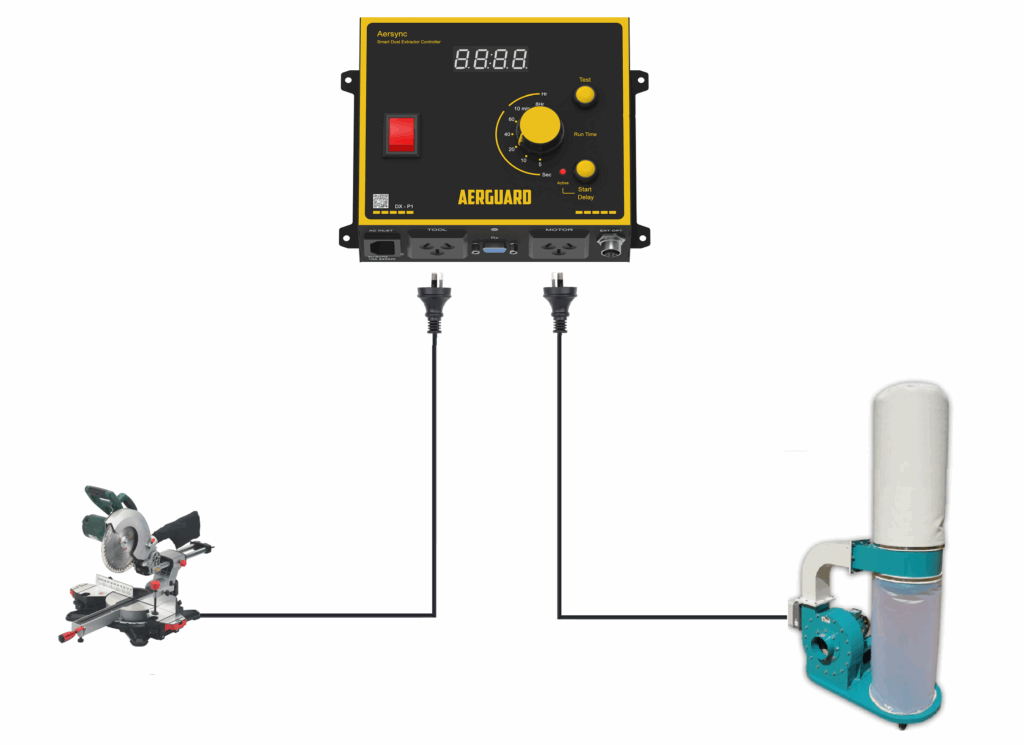
- Switch off the P1. Check that the extractor is plugged into the Motor outlet and its own switch is on.
- Switch on the P1 and press Test. Keep clear of moving parts.
- If the extractor does not start, unplug it from the P1 and try it directly in a suitable, working wall outlet. If it still does not run, have the extractor checked. If it runs directly, contact Aerguard support.
Note: An extractor with a no-volt release (NVR) switch needs a qualified electrician to bypass the NVR for automatic starting. This applies to controllers from any brand, not just Aerguard.
- Switch off the P1. Check that the tool is plugged into the Tool outlet and the extractor is plugged into the Motor outlet.
- Switch on the P1 and start the tool.
- Try another suitable tool within the controller’s power rating. If neither tool starts the extractor, contact Aerguard support.
- Press Test on the Aersync P1. If the extractor does not start, follow the ‘Extractor will not start’ checks first.
- Press ON on the remote while close to the Aerswitch Mini. Check whether the Mini’s red light responds.
- If the light does not respond, replace the remote battery and pair the remote again. If the light responds but the extractor still does not start, contact Aerguard support.
- Check the run-on dial. The P1 can keep the extractor running for between 5 seconds and 8 hours.
- Check whether another tool or ToolSense sensor is still running. Try remote OFF if fitted.
- If it ignores OFF or keeps running after the countdown ends, switch off and contact support.
- Switch off the P1 and unplug the tool and extractor. Do not keep resetting the circuit breaker.
- If safe, try the P1 on its own using a suitable, working wall outlet.
- If the breaker trips again, stop using the P1 and contact Aerguard support. If it only trips when the extractor is connected, have an electrician check the extractor and power supply.
- Switch off the P1 and unplug the extractor. Do not keep resetting the circuit breaker.
- If safe, switch on the P1 and press Test with the extractor unplugged. If the breaker trips again, stop using the P1 and contact Aerguard support.
- If it does not trip, have the extractor and power supply checked. You may also test the extractor directly in a suitable, working outlet if safe to do so.
Still need help? Tell us what happened and which checks you tried.